

Advanced Research Journal of Computer Science
ISSN Print: N/A
ISSN Online: 3134-884X
About: The Advanced Research Journal of Computer Science (ARJCS) is a peer-reviewed, open-access journal dedicated to publishing high-quality research and review articles in the field of computer science. ARJCS serves as a global platform for researchers, academicians, and industry professionals to share innovative ideas, cutting-edge developments, and practical applications in computing and information technology.
Publisher Responsibility
Lumina Quest Publishing is responsible for providing the journal with the necessary publishing infrastructure, editorial support, production services, digital preservation, and dissemination of published content. The publisher supports transparent and ethical publishing practices and ensures that the journal’s publishing operations are conducted in accordance with applicable scholarly publishing standards.
The publisher is also responsible for maintaining the journal’s website, publication systems, archiving arrangements, and administrative support while respecting the independence of editorial decision-making.
Editorial Responsibility
The Editor-in-Chief and Editorial Board are responsible for maintaining the academic and scientific quality of the journal. The editorial team oversees the evaluation of submitted manuscripts, selection and coordination of peer reviewers, editorial assessment and decisions, and adherence to the journal’s scope and ethical standards.
Editorial decisions are made independently on the basis of academic quality, originality, methodological soundness, relevance, and ethical compliance, without inappropriate influence from the publisher, authors, reviewers, or commercial interests.
Editorial Independence
The editorial team maintains editorial independence in all decisions concerning manuscript evaluation, peer review, acceptance, revision, and rejection. The publisher does not interfere with the academic judgment of editors or reviewers.
Advanced Research Journal of Computer Science | Year 2025 | Volume 2 | Issue 2 | Pages 23-30
Leveraging Cloud Computing Applications in Healthcare Systems
Muhammad Tehseen Qureshi 1* and Rida Afzal2View PDF Download XML Download DOI XML DOI: 10.66590/arjcs2025020205
Abstract
Healthcare is a comprehensive approach that focuses on improving the overall well-being of individuals by addressing their medical needs throughout their lifetime. Traditionally, healthcare systems relied heavily on paper-based methods for storing and managing patient information. Before the widespread adoption of digital technologies, medical records were manually maintained, which required extensive physical infrastructure and often resulted in inefficiencies, data loss, and limited accessibility. With the advancement of information technology, cloud computing has emerged as an effective solution for modernizing healthcare systems. This study explores the application of cloud computing technologies to enhance the storage, management, and accessibility of healthcare data. The proposed approach involves the development of a cloud-based healthcare platform where medical centers manage patient data through secure digital accounts. In this system, individual patient profiles are created and organized to store essential medical information, including clinical history, surgical records, and case sheets. The platform enables seamless communication between patients and healthcare providers, allowing the exchange of medical documents, diagnostic reports, and radiographic images. Additionally, it facilitates real-time interaction, improving the efficiency of healthcare delivery and supporting better clinical decision-making.
Introduction
Healthcare Systems
Healthcare is a comprehensive concept that focuses on maintaining and improving the physical, psychological, and social well-being of individuals throughout their lifetime. It is not limited to the treatment of specific diseases but rather encompasses a holistic approach to patient care, addressing all aspects of human health and welfare [1-5].
Historically, healthcare systems relied heavily on manual, paper-based processes for storing and managing patient information. Prior to the integration of modern technologies, medical records were maintained in physical formats, which posed significant challenges in terms of storage, accessibility, and data sharing. Although early digital solutions such as Electronic Health Records (EHR) were introduced, their implementation was limited by infrastructure constraints and technological inefficiencies. With the evolution of advanced technologies, healthcare systems have begun transitioning toward more efficient and scalable digital solutions. Among these, cloud computing has emerged as a key enabler for transforming healthcare data management and service delivery [6-8].
Cloud Computing in Healthcare
Cloud computing refers to a model that provides on-demand access to computing resources, including storage, processing power, platforms, and software applications, over network-based infrastructures. These services allow users to access and manage data without dependence on local hardware limitations, thereby improving scalability, flexibility, and cost efficiency. In the healthcare domain, cloud computing offers significant advantages by enabling secure storage, real-time data access, and efficient communication between healthcare providers and patients. It supports the integration of multiple services, such as medical data storage, backup systems, data processing, and remote healthcare applications [9,10].
Distributed Cloud Systems
Distributed cloud computing extends traditional cloud services by enabling data and applications to be deployed across multiple geographic locations. This approach enhances system performance, reduces latency, and improves service availability. In healthcare, distributed cloud systems facilitate the integration of hospitals, clinics, and healthcare centers across different regions, allowing seamless data sharing and collaboration.
Cloud-Based User Accounts
Cloud platforms enable the creation of secure user accounts for both healthcare providers and patients. These accounts serve as centralized repositories for storing medical records, including patient history, diagnostic reports, and imaging data such as X-rays. Additionally, they support communication between doctors and patients, enabling the exchange of medical information and improving healthcare accessibility.
Service Level Agreements (SLA)
Service Level Agreements (SLAs) play a crucial role in cloud computing environments by defining the expected level of service between providers and users. An SLA specifies performance metrics, responsibilities, service availability, and penalties in case of service failure. These agreements ensure reliability, accountability, and quality of service delivery.
SLAs are essential in healthcare applications, where system reliability and data availability are critical. Properly defined SLAs help align technical services with organizational and clinical requirements, ensuring that healthcare systems operate efficiently and securely.
Motivation and Problem Statement
Despite the advancements in mobile health applications and digital record systems, limitations such as restricted processing power, limited storage capacity, and lack of scalability continue to hinder their effectiveness. These challenges become more critical when handling large volumes of healthcare data, including medical records, diagnostic images, and inter-hospital data exchange.
To address these limitations, cloud computing provides a scalable and efficient solution for managing healthcare information systems. It enables the storage, processing, and sharing of medical data across multiple institutions, regions, and even countries, thereby improving collaboration and healthcare delivery.
Research Objective
The primary objective of this study is to explore the application of cloud computing technologies in healthcare systems and to demonstrate how cloud-based solutions can enhance data management, communication, and service delivery. The proposed approach aims to leverage cloud infrastructure to support efficient storage of medical records, facilitate data exchange, and improve overall healthcare system performance [11].
Proposed Work
In this paper we propose creating cloud for the manager of the health center where the manager is considered the responsible and creates accounts for residents of an area with pseudonyms and real names are known only to the manager for privacy and the accounts is put for each particular area within a group called by the name of the region. the first information needed by the doctor A person's history is medical, surgical or what It is called (Case Sheet) and through these accounts, anyone can send files and radiographs, as well as the patient can communicate with the doctor and send anything related to his medical history and surgical [12].
Material and Methods
Methodology
Previously we mentioned the applications that can be exploited with the cloud and here we created a virtual cloud and we used one of the mentioned applications which is the ability to create accounts from the owner of the private cloud. In this section, private cloud must be created by writing code in local server like xampp server because cloud must be needed internet, then put files of code in htdocs folder by using many modules of php7 .0 languages, and use MySQL as database to take partion from database to cloud [13,14].
Used Tools
Tool software is required in any programming to accomplishment the work. Server, operating system to work on it, database and programing language are required to create cloud. Finally, test all tools to ensure correct work (Figure 1).
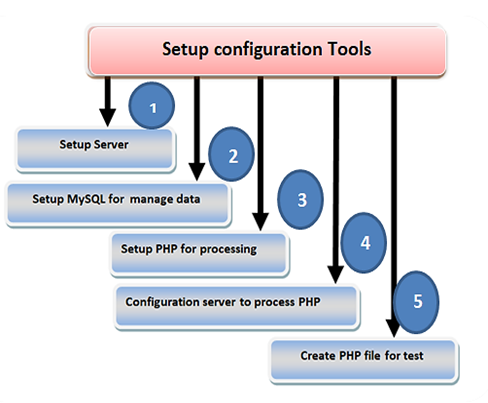
Figure 1: Used Tools
Setup Server
First XIMPP was used and running the Apache server, and since the work was done on a local server, the database must be activated in order for the contents to appear on the browser (Figure 2). There are three accounts that can activate their server addresses. They are address 172.0.0.1, address 1 of IPV6 which is a retrieval address and a local address as in Figure 2. The local address must be activated and then the rest of the addresses. First, the password must be added to make the connection safe, but address remains closed. If page web is not done, go to the xampp controller. Open configuration from apache server, write password in web page, then press GO command on the left (Figure 3).
Setup MYSQL for Manage Data
Xampp controller activate mysql then open URL and write localhost//phpmyadmin. Activating the database by creating it and adding the user and password for fear of penetration and activating the privileges in general if you need a global database (Figure 4).
Setup PHP for processing
You can add the language that is appropriate for the creation of the cloud and according to the tools used, the seventh version and its models are used.Here many modules of php7 .0 languages (libapache2-mod-php7.0 php7.0-cli php7.0-common php7.0-mbstring php7.0-gd php7.0-intl php7.0-xml php7.0-mysql php7.0-mcrypt php7.0-zip) are used in cloud . Each model has commands to contribute to show a specific feature in the cloud. The function and characteristics of each model can be known via the following command in Linux. apt-cache show package name. For example, we choose the model php-cli, so the prompt is apt-cache show php-cli [15,16].
Configuration Server to Process PHP
To Make web pages written in PHP language visible on the browser, the configuration file must be opened and switch the directories between a php.index and a html.index. Index .php is transferred to the first site after the index. Directory, then Ctrl+X is pressed to exit (Figures 6,7).
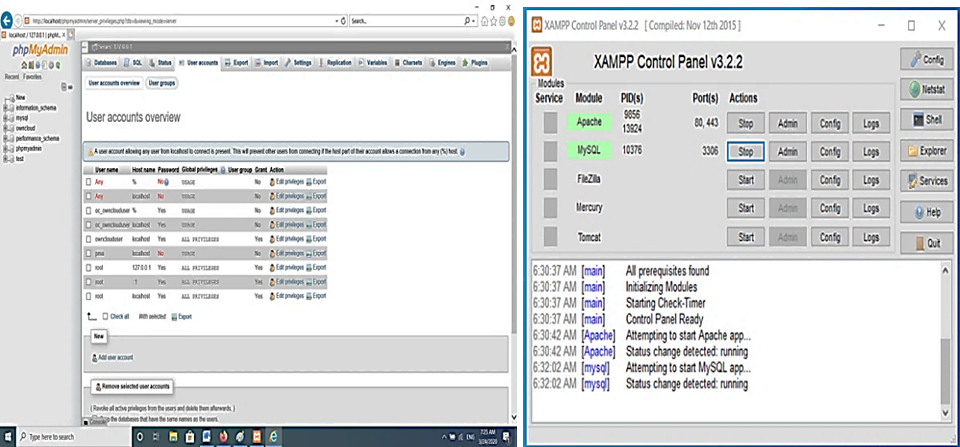
Figure 2: Configuration Server (A) Addresses (B) XAMPP Controller
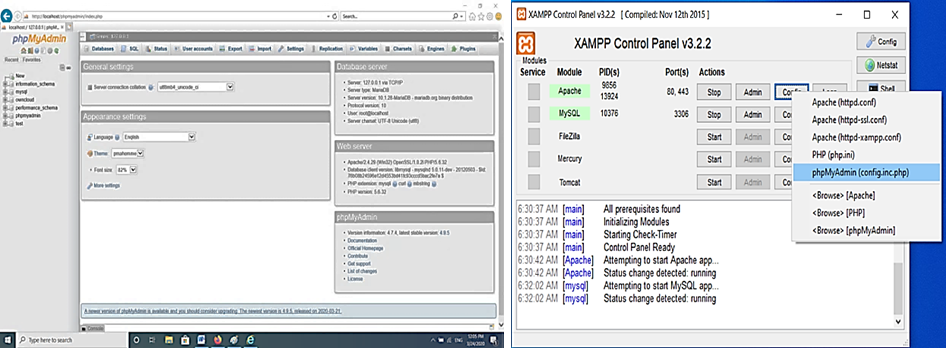
Figure 3: Activation Addresses
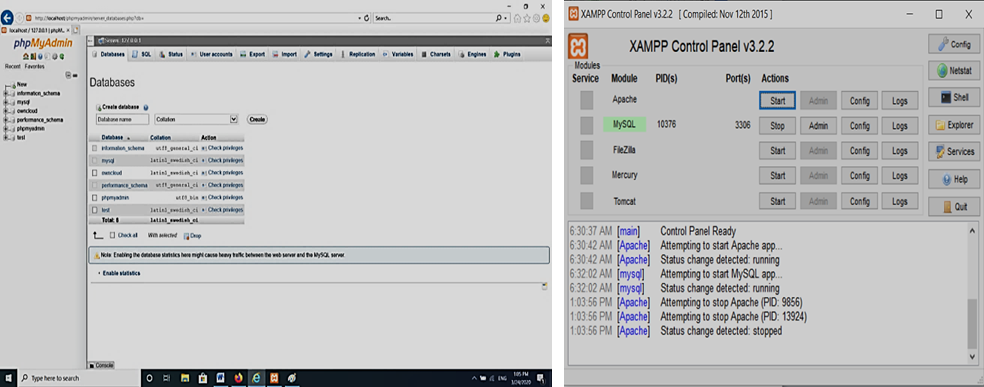 Figure 4: Activation and Addition Database
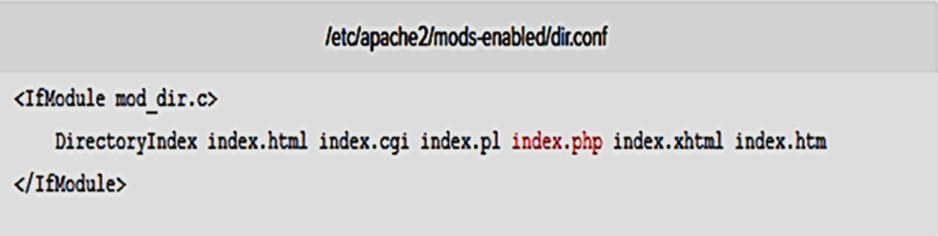 Figure 5: Before Change Position Index.php
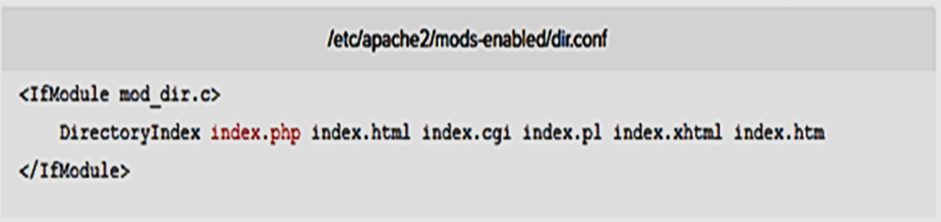 Figure 6: After Change Position Index.php
Creating php File for Test
To ensure that all tools and configuration files are working properly, create a file written in php language and try it by browsing its contents on the browser used.
Create Private Cloud Storage
To create a cloud requires a set of things, the first of which is to locate data base, first: entering again to the database to allocate part of it, to create a cloud making a database in the name of the cloud. Second: enter the user and add the local server to the database of the cloud. Three: activate the global privileges not local. Then check the database by seeing the database within the existing databases. The need for a database of the cloud, to activate the cloud and to add patients' accounts, information and files, (Figure 7).
After tools are installed and configured, private cloud is created and database special for it is ready to save the member, account doctor and each patient are also created, show Figures (9-11).
Sending Case Sheet for each Patient Cloud
Finally, doctor sends case sheet (medical history record, show Figure 12) to all patients by upload from doctor computer to his personal cloud then send to patients’ cloud by email in the patients’ cloud.
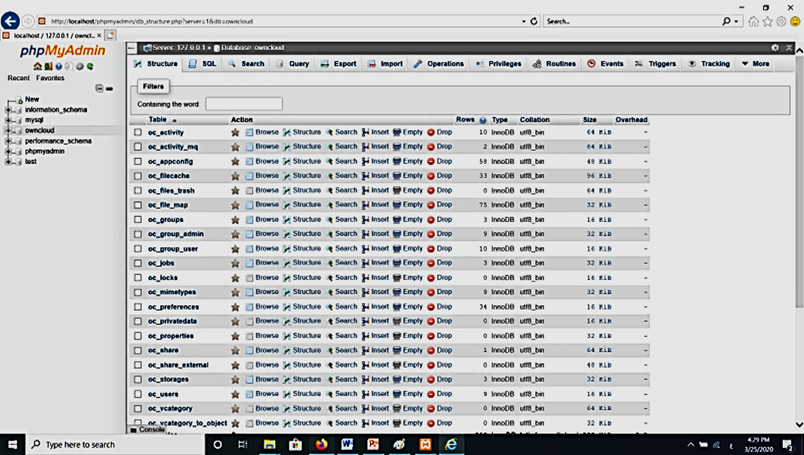
Figure 7: Database for Cloud
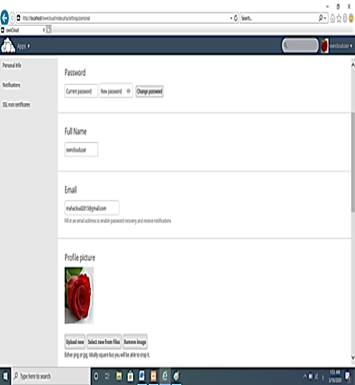
Figure 8: Account Doctor Cloud
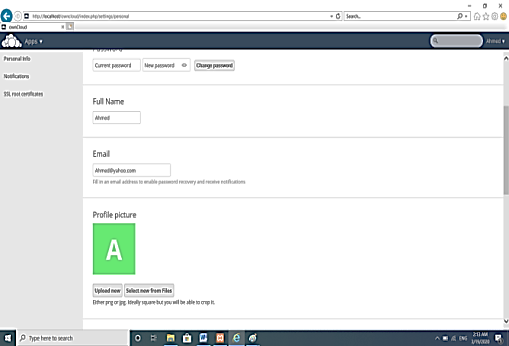
Figure 9: Account Patients Cloud
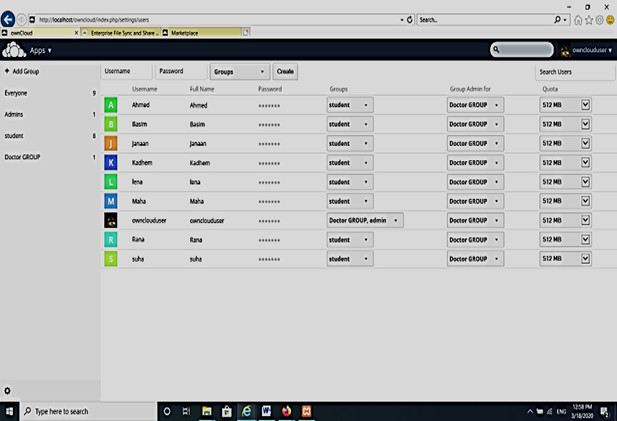
Figure 10: Group of Patients Cloud
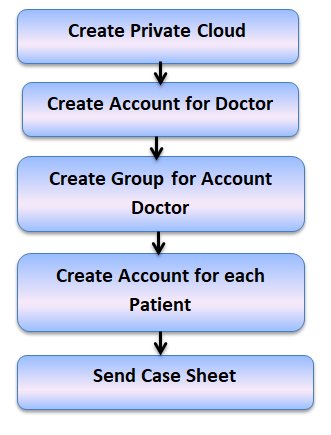
Figure 11: Create Private Cloud

Figure 12: Case Sheet for each Patient Cloud
Results
In Figure 13, doctor cloud is downloading case sheet, then it must be sent to all patients by email that is mentioned in account patient cloud show Figure 10, password and expiration date can be put. pictures and any site can be host on private cloud. Activities in cloud such as download, host in cloud, share by email, it can be illustrated in Figure 15. Which shows the Activities in cloud [17-20].
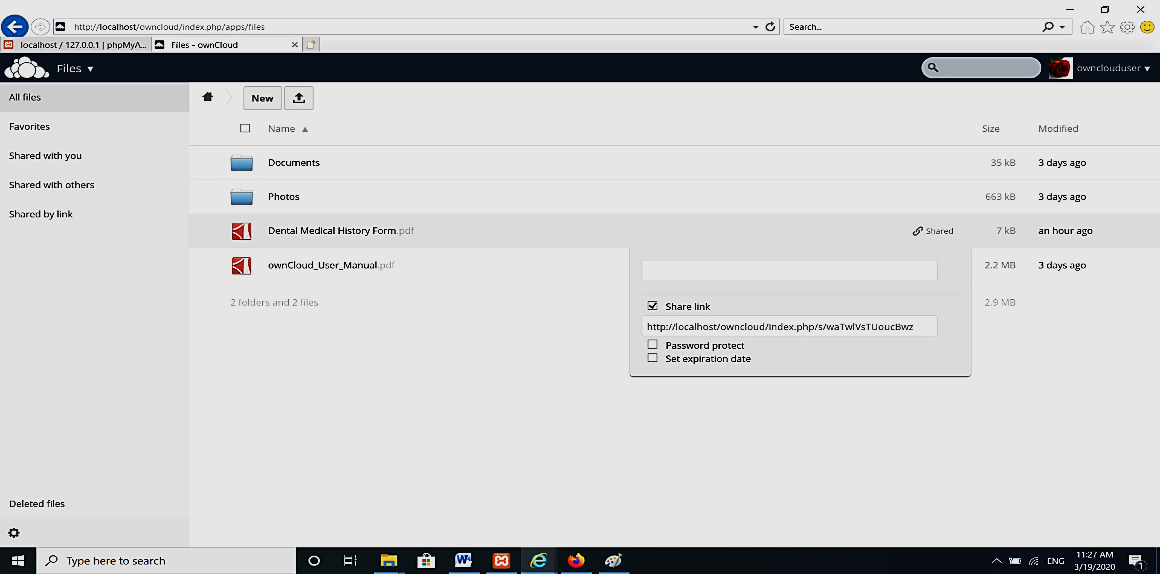
Figure 14: Doctor Cloud Share Document with Patients Cloud
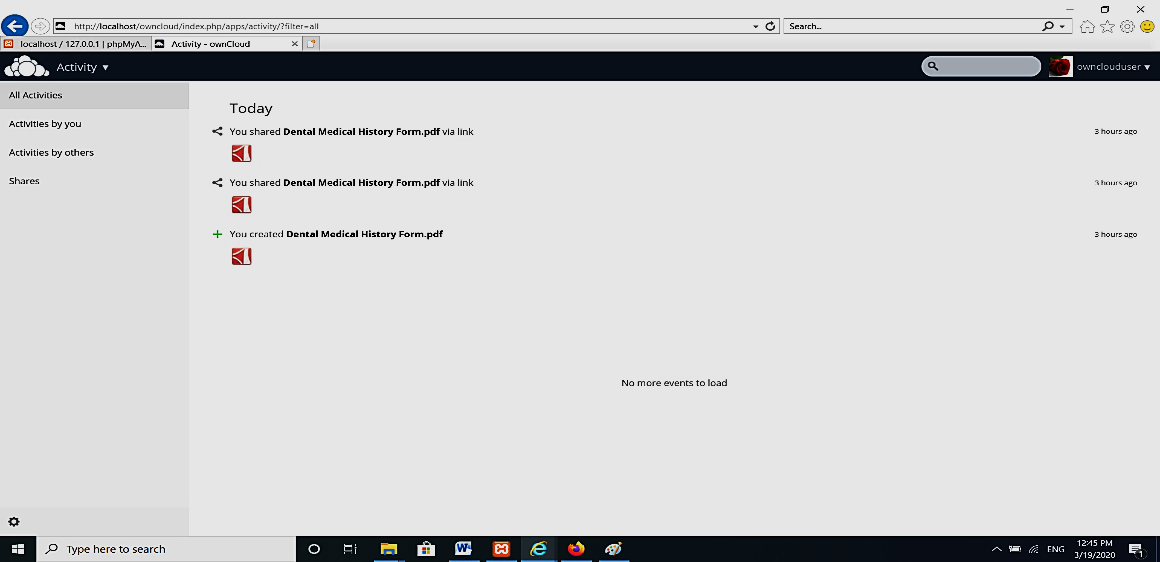
Figure 15: Activities in Cloud
Conclusions
This study demonstrates the potential of cloud computing technologies in improving healthcare data management, accessibility, and security. The proposed system highlights how a private cloud environment can be effectively utilized to ensure data privacy while enabling efficient communication between healthcare providers and patients.
The findings indicate that a private cloud infrastructure can be established within a healthcare setting to securely store and manage patient information. In this model, healthcare providers can create and manage individual patient accounts within a controlled cloud environment, allowing structured organization of medical data. Each patient is allocated dedicated storage space and secure login credentials, ensuring controlled access to sensitive information. Furthermore, the system design allows patients to maintain control over their personal data by managing their authentication credentials, thereby enhancing privacy and user autonomy. At the same time, healthcare providers retain administrative control over the system, including the ability to manage or revoke access when necessary.
Overall, the proposed approach offers a secure, scalable, and efficient solution for modern healthcare systems. It supports improved data sharing, enhances patient–doctor interaction, and contributes to the development of reliable digital healthcare infrastructures.
References
- Allah, Laith Saad et al. “Possibility of employing cloud computing in digital health applications.” Tikrit Journal of Administrative and Economic Sciences, vol. 4, no. 40, 2017.
- Aziz, H. et al. “Cloud computing and healthcare services.” Journal of Biosensors & Bioelectronics, vol. 3, no. 7, 2016. https://doi.org/10.4172/2155-6210.1000220
- Cloud Standards Customer Council. “Impact of cloud computing on healthcare.” February 2017.
- Hassanalieragh, Moeen et al. “Health monitoring and management using internet-of-things (IoT) sensing with cloud-based processing: opportunities and challenges.” IEEE International Conference on Services Computing, 2015.
- Kumar, S. Jagadeesh. “A survey on cloud computing based health care for diabetes: analysis and diagnosis.” January 2015. https://doi.org/10.6084/M9.FIGSHARE.1496528
- Vora, Deesha et al. “Mobile health monitoring privacy system based on cloud.” International Journal of Computer Applications, vol. 109, no. 6, January 2015.
- European Union Agency for Network and Information Security. “Smart hospitals: Security and resilience for smart health service and infrastructures.” November 2016.
- Andrew, John. “Smart Health – and Patient Empowerment.” TRPC Briefing Paper, November 2015.
- Agarwal, Pratik et al. “A survey on hospital management system using smart card and cloud infrastructure.” International Journal of Innovative Research in Computer and Communication Engineering, vol. 4, no. 1, January 2016.
- Nguyen, Tien-Dung et al. “Mobile services meet distributed cloud: benefits, applications, and challenges.” 2018. https://doi.org/10.5772/intechopen.75818
- Sonam, S. et al. “A survey on latency reduction approaches for performance optimization in cloud computing.” International Conference on Computational Intelligence and Communication Technology (CICT), 2016. https://doi.org/10.1109/CICT.2016.30
- Wu, D. et al. “Democratizing digital design and manufacturing using high performance cloud computing: performance evaluation and benchmarking.” Journal of Manufacturing Systems, vol. 43, 2017. https://doi.org/10.1016/j.jmsy.2016.09.005
- Landa, R. et al. “Self-tuning service provisioning for decentralized cloud applications.” IEEE Transactions on Network and Service Management, vol. 13, 2016, pp. 197–211. https://doi.org/10.1109/TNSM.2016.2549698
- Östberg, P.O. et al. “Reliable capacity provisioning for distributed cloud/edge/fog computing applications.” European Conference on Networks and Communications (EuCNC), 2017, pp. 1–6. https://doi.org/10.1109/EuCNC.2017.7980667
- Sujatha, P. et al. “Security threats and preventive mechanisms in cloud computing.” JASC: Journal of Applied Science and Computations, vol. 5, no. 12, December 2018.
- Sharmila, K. et al. “A comprehensive study of data masking techniques on cloud.” International Journal of Pure and Applied Mathematics, vol. 119, no. 15, 2018, pp. 3719–3727.
- Sharmila, K. et al. “MRK-SVM: An effective technique for big data in health care sector.” International Journal of Scientific & Engineering Research, vol. 7, no. 6, June 2016.
- KamalaKannan, T. et al. “Study on cloud storage and its issues in cloud computing.” International Journal of Management, Technology and Engineering, June 2019.
- Khalil-Ur-Rehman, Faisal et al. “Cloud-based architecture of raspberry pi: Personal cloud storage.” Global Journal of Computer Science and Technology: Cloud and Distributed, vol. 19, no. 1, 2019.
- Kilari, Nagaraju. “Cloud computing – An overview & evolution.” Cloud Computing – An Overview & Evolution, vol. 3, no. 1, 2018, pp. 149–152.